
Every campaign, product, rule, and negative in one place
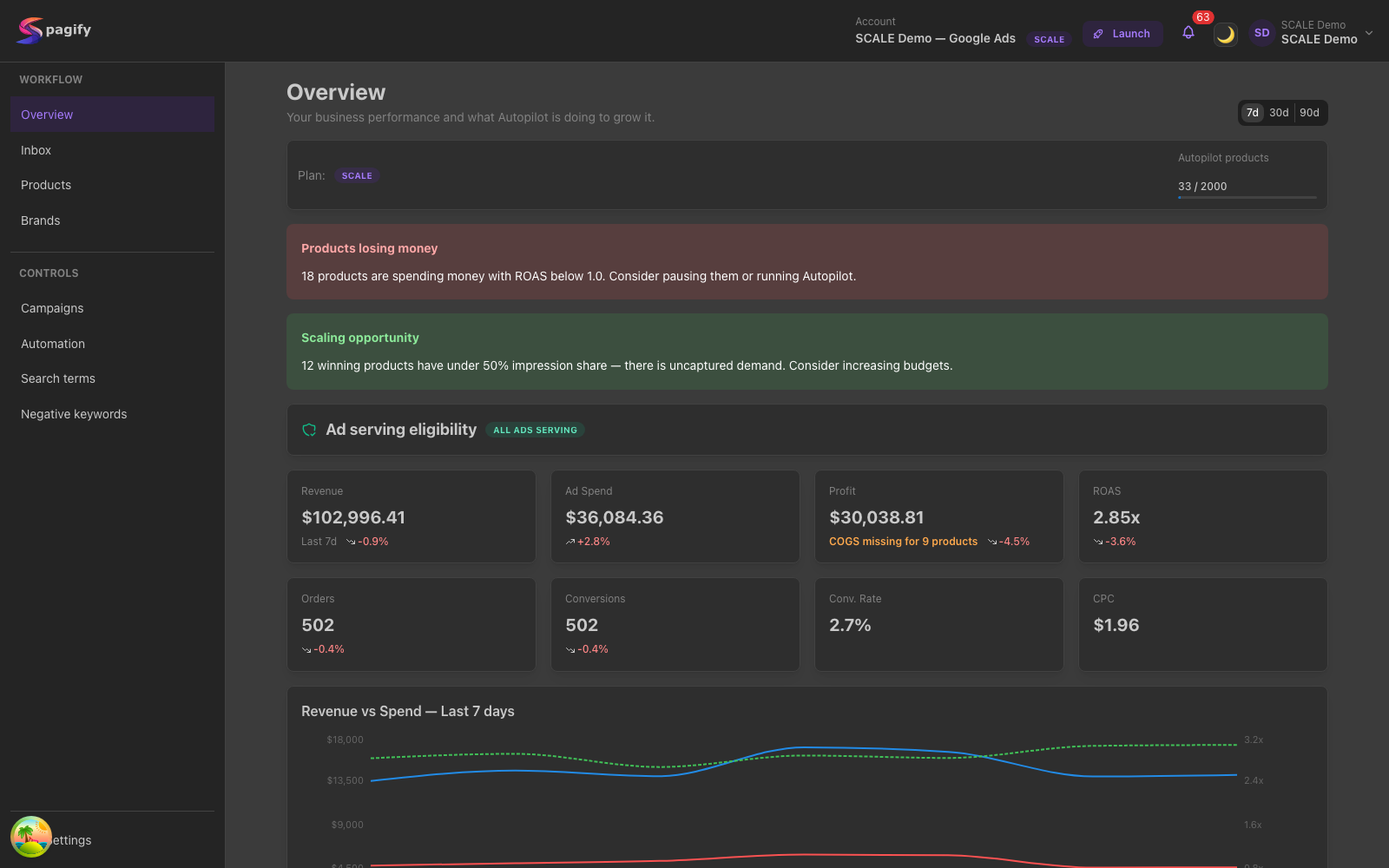
No more stitching Ads Editor, a spreadsheet, and a weekly review together. Here is the workspace, page by page.
Inbox
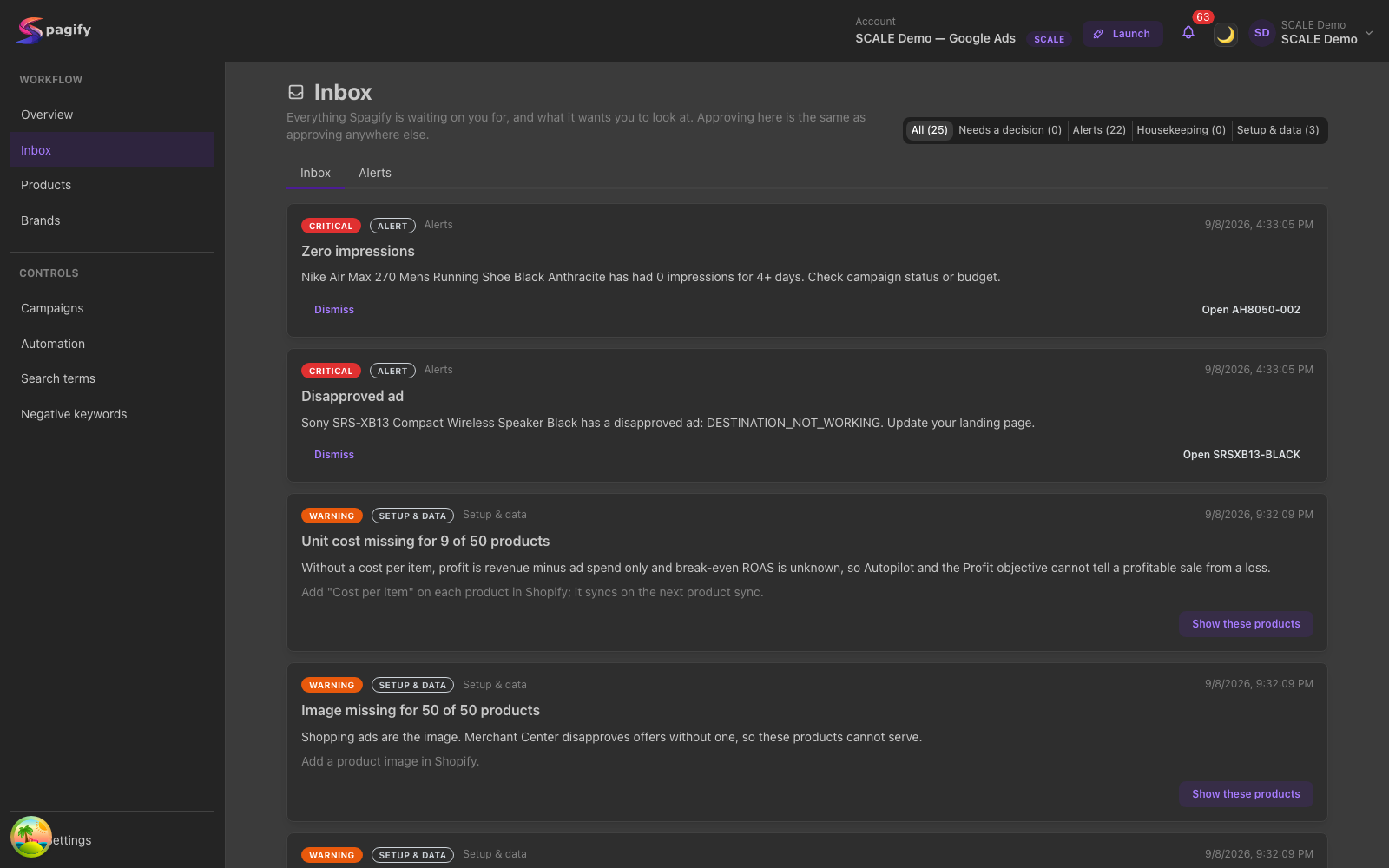
What needs you comes first, one line each, with the open item beside it. Each decision arrives prepared: which searches to block and what they cost, which budget to move and why, and one click applies it. The same alert on many products is one row.
Products
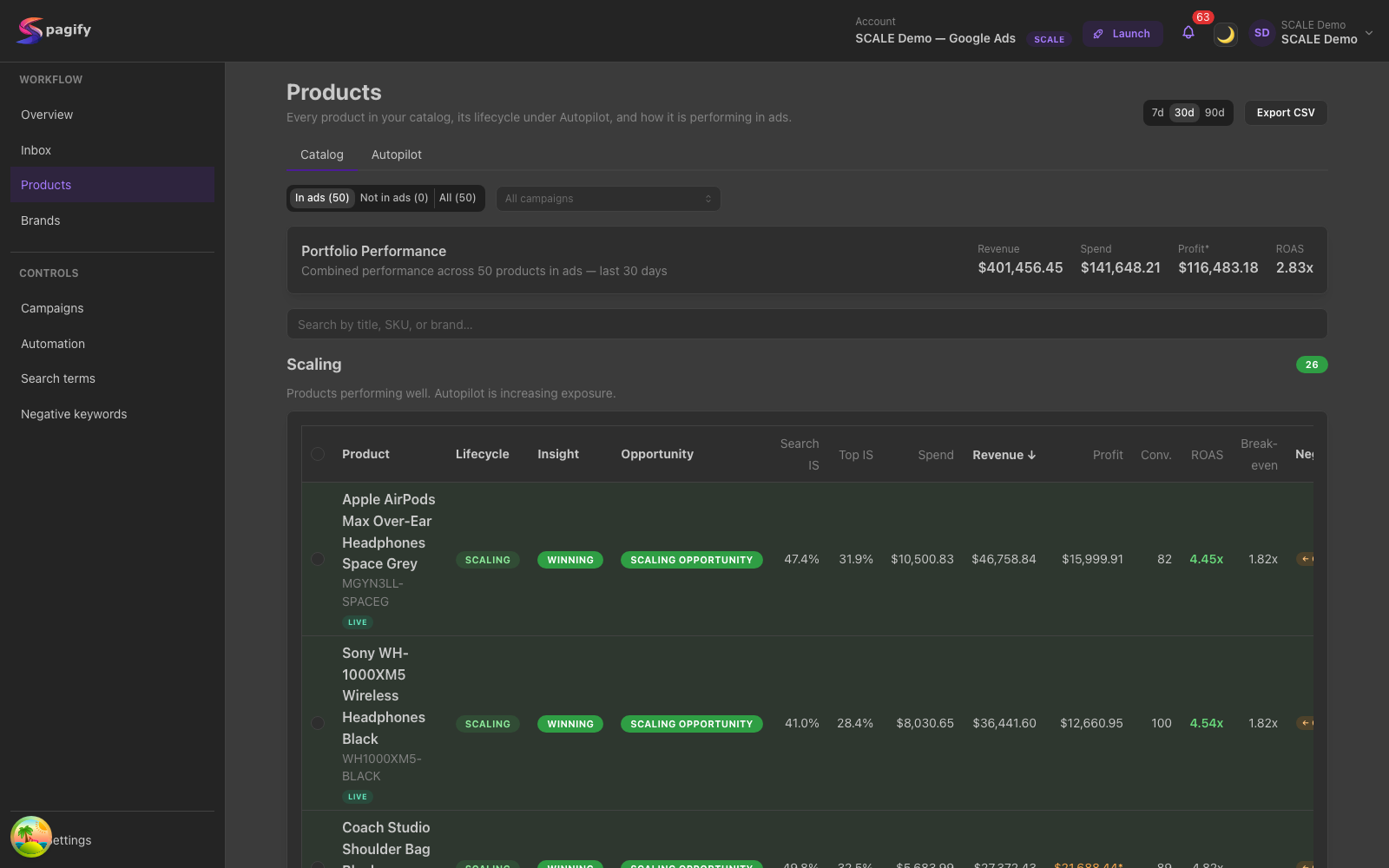
Every product with the stage Autopilot gave it — Scaling, Testing or Paused — and its spend, revenue, profit after unit cost, ROAS against break-even and impression share. Tabs beside it show what each product loses to bid and its price against the market.
Brands
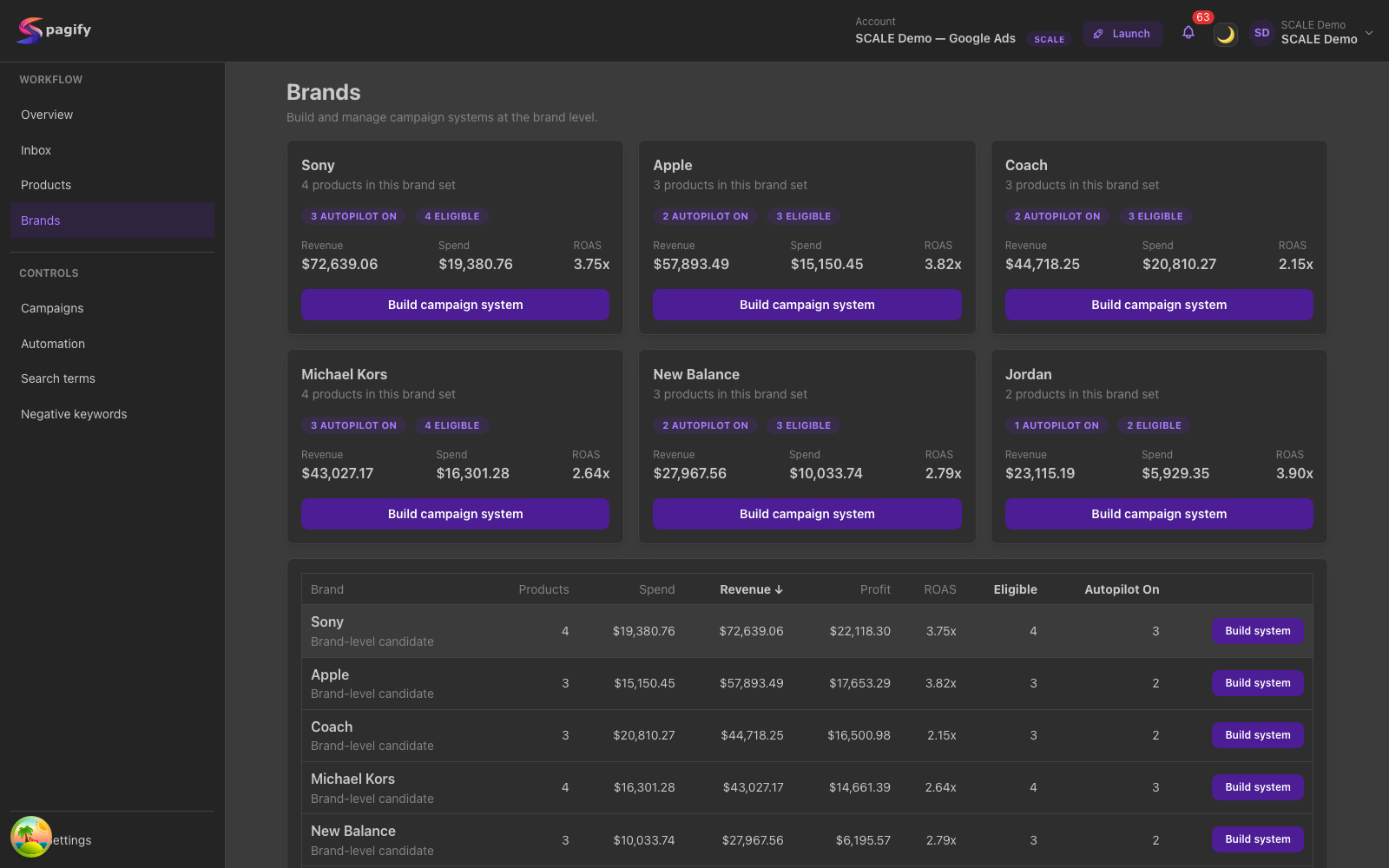
Your catalog grouped by brand, with what each brand spends, earns and keeps after unit cost, and a campaign built for any one brand from the same row.
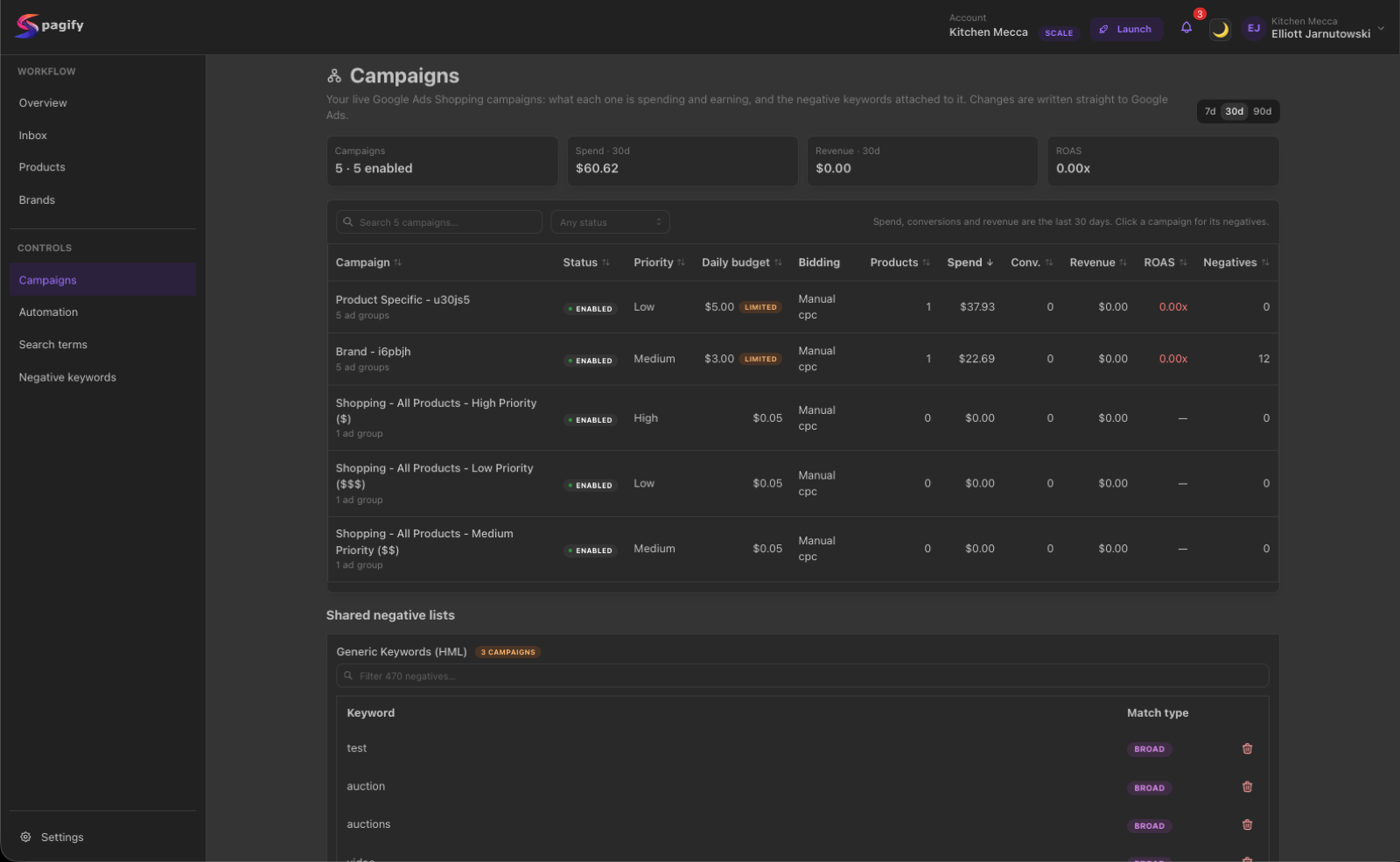
Campaigns
Every Shopping campaign with its priority, daily budget (flagged when Google limits it), bidding, spend, conversions, revenue and ROAS, next to where the rest of the account's spend goes. Each Spagify campaign opens its own page for settings, negative keywords and history.
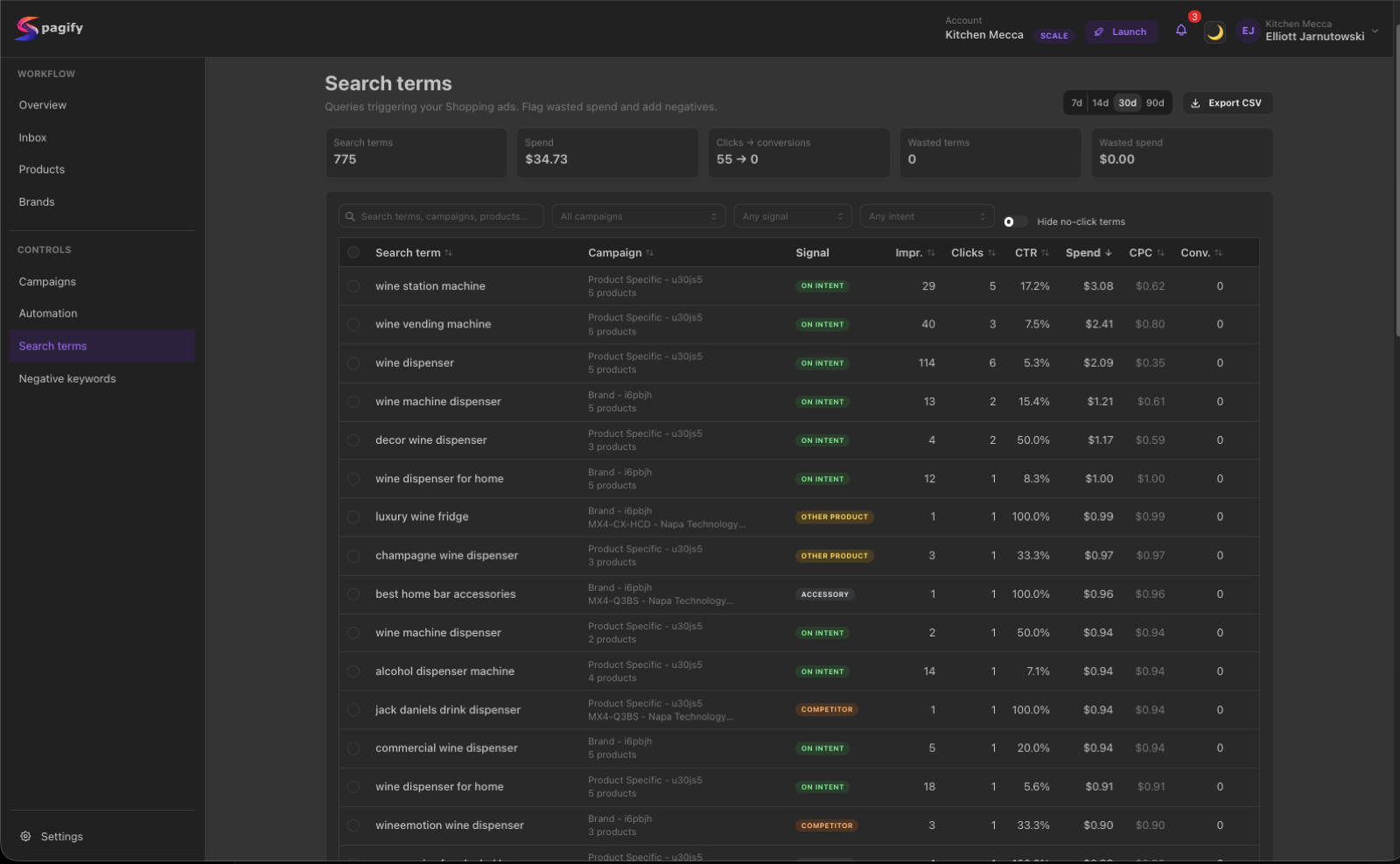
Search terms
Every search that showed your ads, labelled by intent — on intent, other product, accessory, competitor — with what it cost and what it sold. Searches that spent without a sale are totalled at the top and selected in one click.
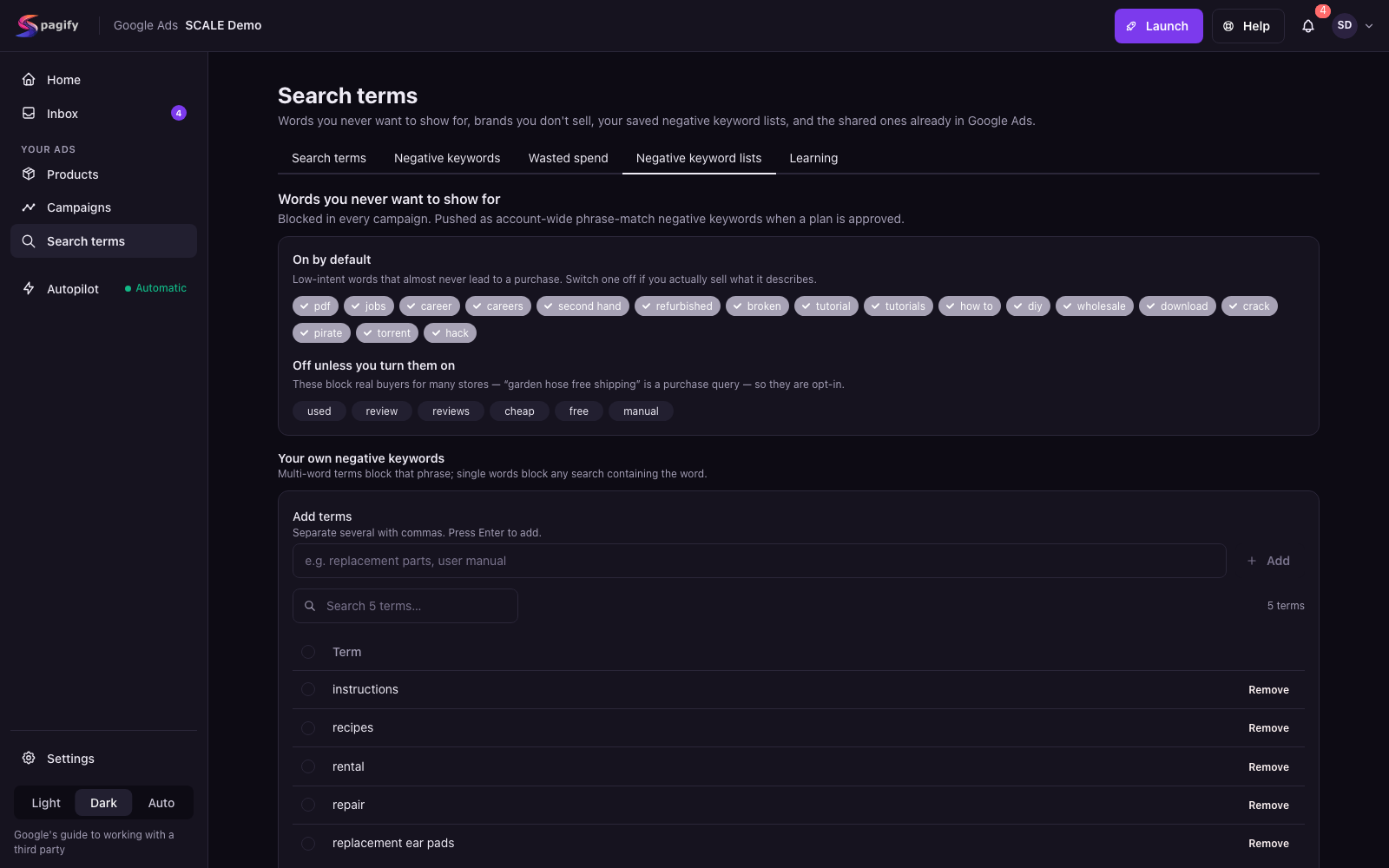
Negative keyword lists
Words you never want to show for: low-intent terms blocked by default, the ones that block real buyers in some stores left for you to switch on, your own list, and brands you don't sell.
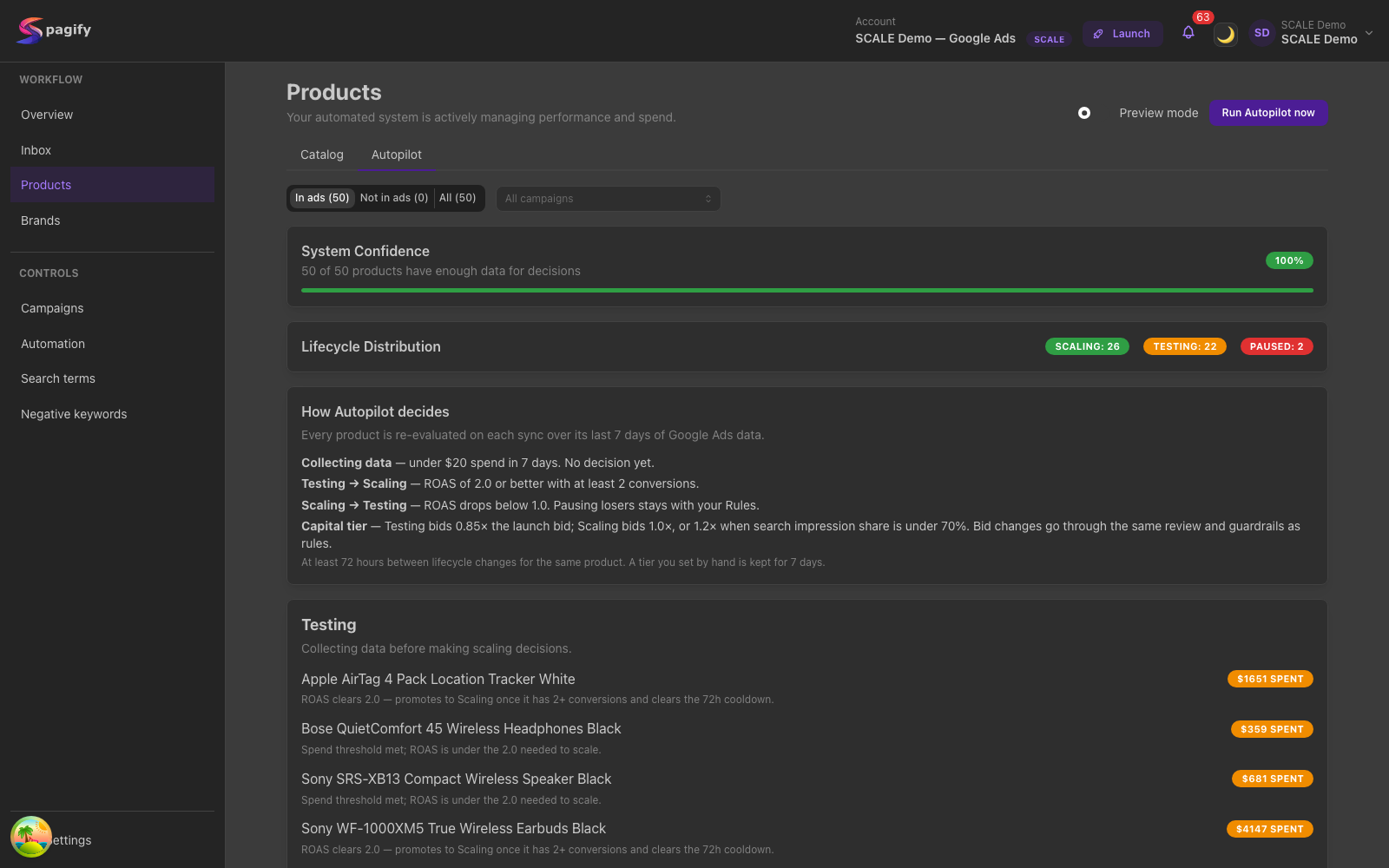
Autopilot
One choice for how much Spagify changes on its own: Off, Review first, or Fully automatic. Under it, the limits it works within and how many of your products have enough data for it to decide.
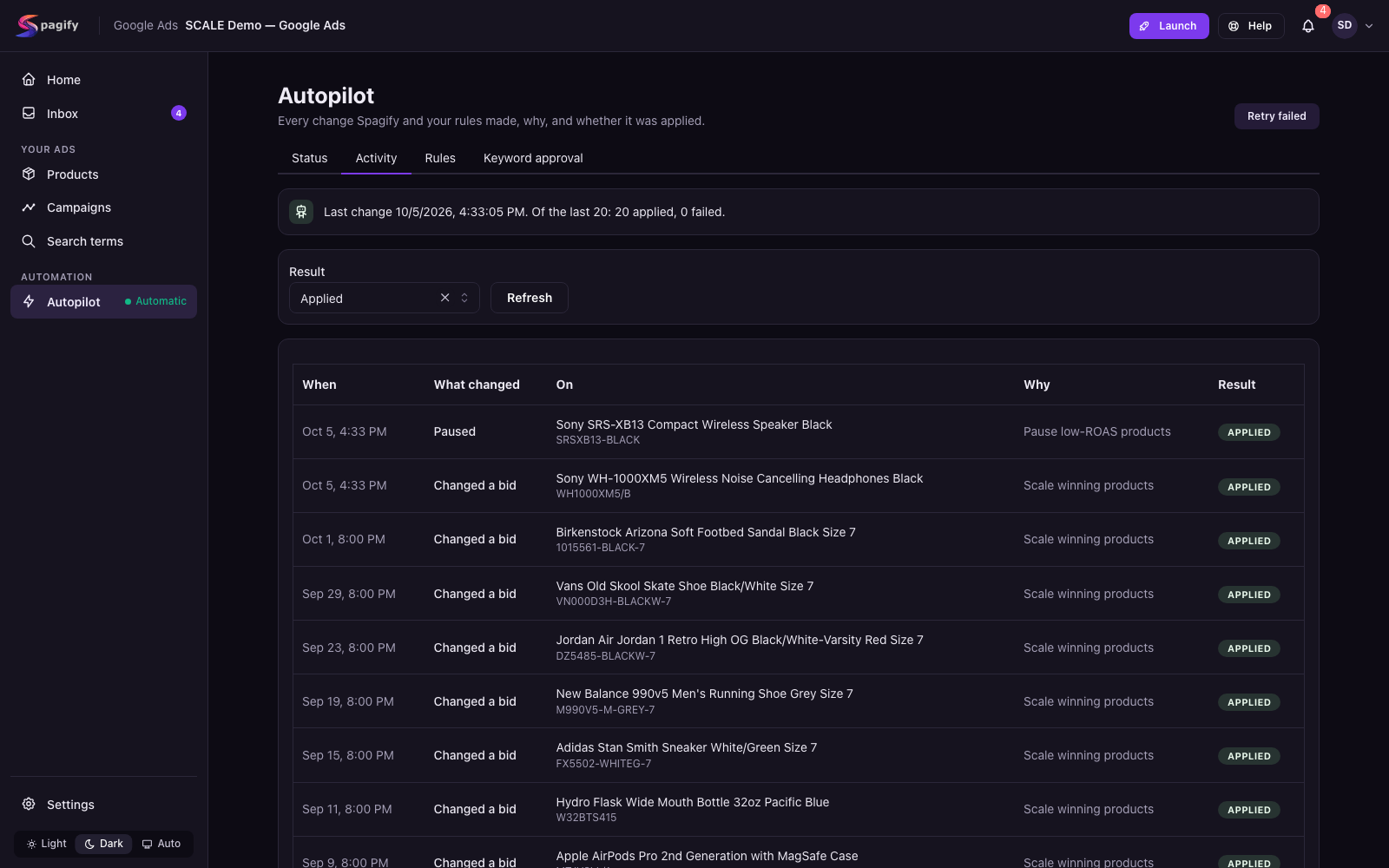
Activity
Every change Spagify and your rules made, in plain words: when, what changed, on which product, why, and whether it was applied.
Running SPAGs by hand isn't a setup — it's weekly ops
Standard Shopping gives you product-level control, but the workflow is still held together with Editor, spreadsheets, and manual review.
01
Every launch is an ad-build project
By the time products are synced, SPAGs are built, ads are checked, and tracking is in place, a launch eats a chunk of the week before spend even starts.
02
Search terms leak spend faster than you block them
Query drift happens daily; negative keywords get reviewed weekly. The gap is money spent on terms you never meant to buy.
03
Weekly product tests outrun the ad account
Most tests die within a week, but the account lags behind: dropped products keep spending, winners share an ad group with losers, and the totals look fine while three products carry the rest.
Stop plumbing the waterfall by hand
Spagify builds and maintains the routing structure so you can run Standard Shopping with control.
The weekly Standard Shopping workflow, turned into software
Standard Shopping has no positive keywords — negative keywords are the only steering wheel. Here's the routing pattern Spagify builds and keeps in sync.
Priority is routing order, not value. Google checks campaigns High → Medium → Low at auction time. The cheapest, broadest traffic enters at the top; product-specific queries fall through to the bottom, where the highest bid lives.
Generic / discovery
Lowest bid
Checked first. Catches broad category queries. Negative keywords here push brand and product queries downstream.
Brand
Medium bid
Catches brand queries that fall past High. Negative keywords here push exact-product queries further down.
Product / SKU
Highest bid
Final catch — exact product matches and your best converters land here on purpose.
Standard Shopping has no positive keywords — products match through the feed, and negatives are the only steering wheel. Spagify generates the routing negatives for each tier and keeps them in sync as the catalog grows.
01
Connect Shopify and your Google Ads account
Item-level product data comes in from Shopify, and the Google Ads account you already run is read in full: structure, priorities, every negative. No extra feed tool to get started.
02
Build SPAGs on the waterfall
One product per ad group, with the three priority campaigns wired: generic enters at High, brand falls to Medium, product/SKU lands at Low.
03
Route queries with negative keywords
Generate the cross-product negative keywords that keep each SPAG matched only to its own product. Review per product, push to your Google Ads account.
04
Run on Autopilot, approve from the Inbox
Autopilot moves products from Testing to Scaling on real ROAS, rules handle the edge cases, and anything you want to review first waits in the Inbox.
See it on your own catalog
Connect a store and Spagify builds the routing structure for you.
Completely automated — until you want the wheel
Out of the box, on every paid plan, Spagify runs the loop for you: launch, bids, shared budgets, safe negative keywords, every guard. Flip one setting per ad account and the same engine proposes instead of applies, so you approve every change before it reaches your Google Ads account.
Automatic
The default. Nothing to babysit.
Products move from Testing to Scaling and back on their own, on real ROAS and conversions
Funnel bids step against the shared budget every hour; budget flows toward what is converting
Searches that never buy are blocked as they appear, and Monday's report shows the dollars they would have cost; low- and medium-risk negatives approve themselves
Ads pause when a product is out of stock or disapproved, and resume when it is back
Rules run every sync; alerts fire when something needs a human
Review-first
Same engine, your approval in front of it.
Set an account to review-first and every change waits in your Inbox
Preview any Autopilot run before it applies a single change
Every negative, bid and lifecycle decision is visible per product, with the reason
Hard spend ceiling, cooldowns and rollback per sync batch, always on
What Spagify handles today
Built around the work Standard Shopping teams already do by hand every week. The whole loop runs on every paid plan; from Growth up the judgement calls \u2014 medium-risk negatives and budget moves \u2014 are applied for you instead of waiting in your Inbox.
Priority Funnels that run themselves
Generic, Brand and Product Specific campaigns on one shared budget, one product per ad group. Bids step hourly and daily against the budget and each product's own results; the funnel repairs itself when the waterfall breaks.
Autopilot lifecycle
Every product is re-evaluated on each sync: Testing until it has enough ad spend, Scaling on ROAS and conversions, and stopped as Failed before it wastes more. Guardrails cap the ad spend.
Guards that pause and resume
Out of stock, or disapproved by Google: the ad group pauses and comes back when the product does. You are told when one of your Performance Max campaigns also sells a product with live Spagify ads; search partners and display expansion are switched off when they earn under half of Google Search.
Inbox, rules and review mode
Every decision waiting on you in one queue, with the reason. Product-level rules with cooldowns and a test mode on top. Set Autopilot to Review first and every change waits for your approval instead of applying.
Negative keywords next to the searches
Each campaign's negative keywords, the words you never want to show for, brands you don't carry and saved lists sit beside the search terms they block, pushed to your Google Ads account in the background with per-placement progress and rollback.
AI search-term mining
A model labels the intent behind every clicked query — competitor brand, accessory, informational, wrong audience — and proposes the uncarried brands and off-intent terms to exclude. Low- and medium-risk negatives approve themselves; the rest wait for you.
Existing-account import
Connect the Google Ads account you already run and Spagify reads it: the structure, the priorities, every negative. Your negatives are classified and carried over; the ones that block products you sell are flagged.
Price against the market
Google's benchmark for every product other retailers also sell, and an alert when an advertised product is priced well outside it. With Price Intelligence, your competitors' storefront prices and who outranks you in Shopping.
Profit-aware reporting, weekly
Item-level revenue, spend and profit after unit cost, the spend Spagify stopped on searches that never bought, a daily note per funnel on what moved and why, and a Monday summary of the week against the week before.
Search-term mining and negative keyword optimization, with a model in the loop
Routing, isolation and waste blocks stay deterministic — they come from your catalog and your click data. The model is used only for the two jobs that need world knowledge: what a query means, and which brands and terms your store should never pay for.
Intent on every search term
Each clicked query is read against the product that served it and labelled: on intent, other carried product, uncarried product, competitor brand, accessory, informational, wrong audience. The label tunes the waste rule and proposes early blocks for confident off-intent traffic.
Brands you don't carry, proposed for you
The model reads your catalog by category and proposes the competitor manufacturers and category-specific off-intent terms shoppers will search for — then Spagify guards every proposal against your own brands and products before you see it.
Memory that learns from your approvals
Every keyword you approve or block becomes a rule that pre-classifies the same term on similar products. Confidence drops when you override it, so the system follows your judgement, not the other way round.
Guarded by design
Every proposal is checked against your own catalog before it becomes a negative. Low- and medium-risk ones approve themselves and push on the next sync; high-risk terms and policy blocks always wait for you. Every model call is metered, and each plan carries a monthly allowance.
Built for dropshippers who run their own Google Shopping campaigns
Every product test is an ad-build, generic searches eat the test budget, and the winners subsidise the losers. Spagify is for the store that wants that to stop without hiring an agency.
Best fit
Shopify dropshippers running Google Standard Shopping
One to ten people, with the owner running the ad account
Stores that test new products every week and kill most of them
Any catalog size: 40 products in test or 900 in the store
Operators who want to decide which product shows for which search
Not a fit
Performance Max only, and happy with it
Meta only, with no plan to run Google Shopping ads
Stores that only need feed sync or a tidy Google Merchant Center account
Anyone looking for a set-and-forget AI ad platform
Flat pricing that scales with your catalog, not your ad spend
Every paid plan runs the whole loop on its own; the tiers add capacity, depth and support. Pay yearly and get two months free. 21-day trial on every plan.
Enterprise is custom-priced. See the full comparison and add-ons.
What Spagify does with your Google access
An operating layer for Standard Shopping needs to read and write inside the Google Ads account you connect. Spagify shows you these lists again before Google's consent screen.
What Spagify reads
- Google Ads account: your campaigns, products, search terms, costs, conversions and conversion actions, including the chats, quote requests and calls your ads bring in.
- Google Merchant Center account: your products' approval status, disapprovals, categories and barcodes, and its price competitiveness and price insights reports: Google's benchmark price and suggested price for each product, and the change in impressions, clicks and conversions Google predicts at that price.
- With Price Intelligence, the competitive visibility report in your Google Merchant Center account: the stores that show beside yours in Shopping and how often they rank above you. Spagify then reads those stores' public prices to compare with yours.
- Google Analytics property, if you allow it: product views, add-to-carts and purchases.
What Spagify changes in your Google Ads account
- Creates and runs Spagify's own Shopping campaigns: bids, budgets and negative keywords.
- Adds negative keywords to your account's list, which applies to every campaign in the account.
- Links your Google Merchant Center account to your Google Ads account, and asks Google to review disapproved products again.
- Pauses, turns on, or takes products out of your other campaigns only when you choose to.
- Fixes conversion tracking that cannot record a sale: counts or shows again a conversion action already in your account, or creates one. It never switches one off.
- Sizes its bid changes with a small model built only from your store's own bid changes and the clicks and costs that followed. No other store's data goes into it, and it is used for no other store.
Who else uses it
- Anthropic's Claude reads your search terms with their impressions, clicks, ad spend, conversions and Google Ads revenue, the negative keywords already in your Google Ads account and the campaigns they sit in, and your store's name and your products' titles, brands, types and prices. It uses them to sort searches by whether they match what you sell, to suggest and check negative keywords, and to group your products by category.
- To explain why a product is shown or clicked less than it should be, and what to change, Claude also reads that product's bids, ad spend, impression share and click rate beside Google's benchmarks, its approval status, disapprovals and Google's benchmark price from your Google Merchant Center account, and how often it sells, from your orders or, if you allow it, your Google Analytics property. Anthropic does not train its models on any of it.
- Spagify uses the results from every store, yours included, to test and improve its automation for all stores. No other store sees your search terms, products or numbers.
- Depending on how your Google Merchant Center account is set up, Google may share its apps data, Spagify's included, with Google's Business Manager.
What Spagify will never do
Hard limits, written into our privacy policy
No access to Gmail, Drive, Calendar, Contacts, or Photos
No sale of Google user data, ever
No targeted advertising using Google account data
Spagify's use and transfer of information received from Google APIs adheres to the Google API Services User Data Policy, including the Limited Use requirements. Full details are in our Privacy Policy and, permission by permission, on the Permissions page.
Questions operators ask first
The fit is specific, so it helps to answer the filtering questions up front.
Get early access
Built for Shopify stores running Standard Shopping at any catalog size. Every plan runs the whole loop on its own; the 21-day trial shows it on your catalog.